
One Measurement, Different Times: Understanding UTC and Local Time
This article explains the UTC offsets, date boundaries, and time field meanings necessary for comparing medical device software screens with server records, illustrated through a virtual case.
Judging the Order of Records Based Solely on Displayed Time is Not Possible
Even if the measurement screen shows 9 AM and the server record shows 12 AM, both values can represent the same moment.
Comparing displayed times with different standards directly may misinterpret normal records as transfer delays or time errors.
When reviewing data integration in medical device software, it is clearer to first define what event the two fields represent, including date and UTC offsets for comparison.
This article describes the display and exchange formats of measurement records.
The following review procedure is a practical proposal from MedQraft and does not designate legal storage formats for specific products.
Applying UTC Offsets Allows You to Calculate if They Are the Same Moment
UTC is the common reference used when comparing times.
A UTC offset denotes the difference between the displayed local time and UTC.
If it shows +09:00, local time is 9 hours ahead of UTC, so subtracting 9 hours from that time gives you UTC.
RFC 3339 explains the format for timestamps exchanged on the Internet and this calculation relationship.[1]
Displaying a virtual test record in both ways might appear as follows:
| Display Criteria | Timestamp for the Same Record |
|---|---|
| Local time 9 hours ahead of UTC | 2026-10-04T09:00:00+09:00 |
| UTC | 2026-10-04T00:00:00Z |
The time difference between the two values is not 9 hours, but 0.
This is the result of applying the offset converted to the same standard. Z denotes UTC time in its notation.
However, Z alone does not reveal where the record was created or the local time zone of that location.
This distinction is also reflected in the description updating RFC 3339 provided by RFC 9557.[2]
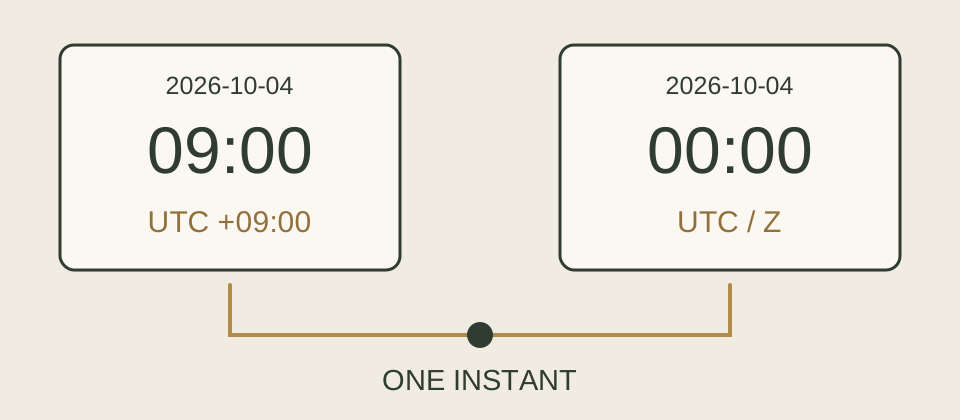 Applying the offset makes the two displays correspond to one event point.
This illustration expresses the virtual record across time zones.
Around Midnight, the Date Also Changes
If only the time is converted and the date remains unchanged, an error of a day could occur.
In the same virtual test, if you change the measurement time to 12:30 AM local time on October 4, the UTC value becomes 3:30 PM on the previous day, October 3.
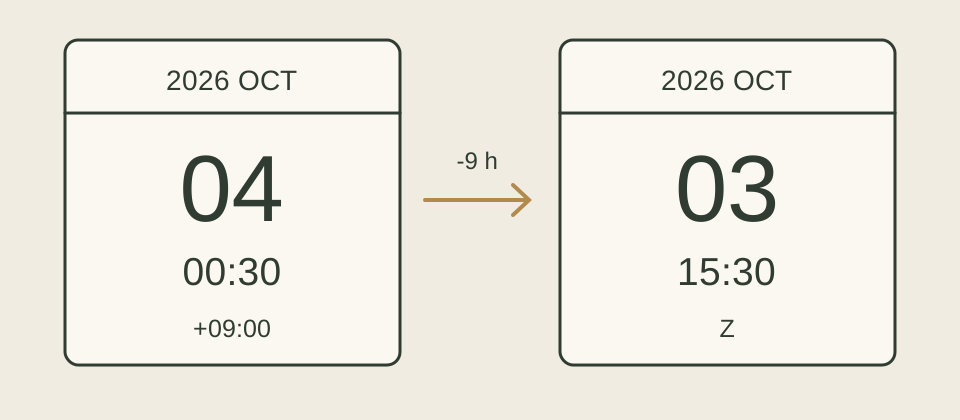 Offset conversion includes dates as well.
A day aggregated based on local date and a day aggregated based on UTC date can represent different intervals.
This difference also affects the count of daily measurements or test results.
To compare the ‘October 4’ list on the display and the ‘October 4’ query on the server, you must first confirm whether the day’s start and end for both functions are based on the same standard.
In this example, the day of October 4 in local time corresponds to UTC from 3 PM on October 3 until just before 3 PM on October 4.
If you define the query conditions to include times starting from the day threshold to the next day's start, it’s easier to avoid duplicating points at the boundary.
Measurement Time and Receipt Time Are Different Fields
Even if the time zone conversion is correct, values recorded for different events may not match.
For instance, the moment the device generates a measurement value and the moment the server receives that value should be read distinctly.
If all field names indicate ‘time’, the testing personnel may find it difficult to interpret the significance of the difference.
It is recommended to include the event's meaning, time origin, exchange format, and display criteria in the field definitions for use by development and testing teams.
The following table is a customizable example for your product:
| Field | Event to be Recorded | Review Considerations |
|---|---|---|
| measured_at | Measurement value creation | Whether assigned by the device, at which point during measurement start/end |
| received_at | Server reception | Whether assigned by the server, if newly recorded during retransmission |
| Measurement time on display | Display of measured_at | Applicable time zone, date, precision for sub-second parts |
If the clocks of two devices are not synchronized, even correctly applying offsets may not accurately restore the actual order of events.
Interpreting the difference between receipt time and measurement time solely as communication delay requires inspection of clock synchronization and the point of generation for each field.
The required clock accuracy and acceptable differences should be determined according to the product's use and characteristics of that functionality.
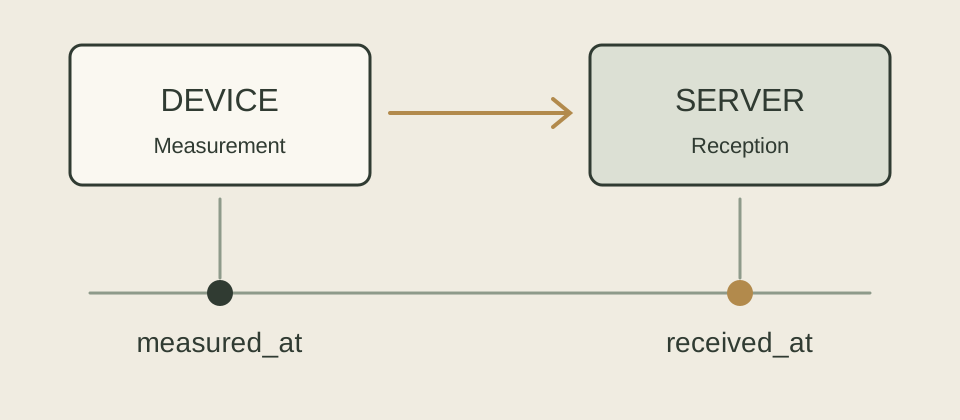 Measurements and receipts are distinct events.
The tasks of displaying both fields in the same time zone and interpreting the differences between the two events are separated.
Testing Confirms Storage, Query, and Display of the Same Record
By assigning unique identifiers to test records and leaving the input timestamp, server query value, and display value side by side, it becomes easier to find the points of conversion.
Compose separate cases to check whether the comparison results remain the same when inputting the same moment with different offsets, and if midnight records are included in the intended date lists.
| Internal Testing Example | Expected Judgment |
|---|---|
| 2026-10-04T09:00:00+09:00 and 2026-10-04T00:00:00Z | Compared as the same instant |
| 2026-10-04T00:30:00+09:00 | UTC conversion result becomes 2026-10-03T15:30:00Z |
| Input without offset 2026-10-04T09:00:00 | Refused or interpreted separately according to set input rules, not regarded as UTC without grounds |
| Querying the same record from screens set to different time zones | Even with changed display times, indicates the same event |
The numerical offset represents the difference in that point in time.
If the local schedule itself is important, like 'every day at 9 AM' in areas that apply daylight saving time, it should be reviewed whether it is sufficient to simply use a steady current offset.
Local time zones contain daily rules, differing from offsets and functions.[2] This fixed +09:00 example should not be blindly applied to schedule calculations in all regions.
Questions to Leave for Record Review
It should be clear which event the ‘measurement time’ refers to on the current interface, how inputs without offsets are processed, and which time zone is applied for daily queries.
If any of these three aspects are interpreted differently among development, testing, or operational personnel, it is advisable to first align the definitions for the respective fields.
Subsequently, tracking a single test record at the midnight boundary from storage to display can reveal the impact that different interpretations have on actual outcomes.
References and Related Articles
Checked on: October 4, 2026.
The tables and figures are virtual cases created by MedQraft and do not represent actual measurement data from equipment.
- [1] IETF RFC 3339, Date and Time on the Internet: Timestamps, 2002. §4.2 Offset Calculation, §5.6 Format, §5.8 Examples.
- [2] IETF RFC 9557, Timestamps with Additional Information, 2024. §1.1 Definition of Time Zones and Offsets, §2.2 Updated Meaning of RFC 3339's Z Notation.
- Medical Device Software Requirements and Testing Evidence: An article to read in conjunction when linking timing processing rules to testable requirements.
- Translating Regulatory Judgments into Software: A related article addressing the rules and structure of data.
Let's talk
Apply what you have read
to your product.
Tell us your product's current stage and the questions you need to review.
Discuss your questions ↗