
Entering 10, Recording 100: Investigating Infusion Pump Input Errors
This article explains methods for reviewing operational videos and comparing input events and screens based on FDA-released examples of infusion pump input errors.
When numbers are displayed differently than expected, it is necessary to check side by side the actions taken by a person and the inputs processed by the device.
It is difficult to determine the cause just by looking at the value displayed on the screen, as it could be due to user mishandling or a failure of specific components.
For those involved in medical device development and quality, records that help distinguish at which stage a value has changed can be beneficial when investigating input errors.
The FDA introduces a phenomenon (key bounce) as one of the cases of infusion pump issues, where a single key press is interpreted as multiple inputs.
In the reported example, a user enters 10 mL/hour, but the device records it as 100 mL/hour.
This number is an example described by the FDA and is not a recommended infusion rate.
This page serves as material to introduce the type of issue and is not a report that presents the latest recall announcements from specific manufacturers or the incidence of this phenomenon.
[1]
First, Separate the Three Observations
The starting point for investigation suggested in this article is to distinguish operation, input events, and display values.
It is necessary to document what the user pressed, what event the device received, and what value appeared on the screen.
Finally, it should also be confirmed whether that value was reflected in the confirmed set value.
For example, the fact that 100 was displayed on the screen informs about the display result.
However, just that screen cannot reveal whether 0 was pressed twice, if the input was processed in duplication, or if the value changed at another stage.
To narrow down the potential causes, the different observation points must be connected.
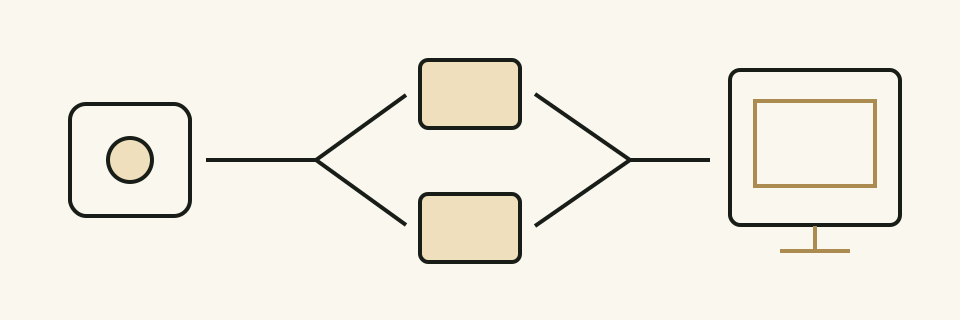 This is a conceptual diagram that distinguishes between button operations and the events processed by the device.
The two event displays illustrate possibilities for investigation and are not actual logs from a specific product.
The current FDA example does not directly apply to devices currently under development to confirm the cause.
Although the appearance of errors may be the same, the path of occurrence can vary between products.
In investigation notes, it is clearer to write ‘observed facts’ and ‘investigable possibilities’ in separate sections.
Virtual Development Test: The Number on the Screen Increased by One Digit
The following is an example created by MedQraft, assuming a test environment not connected to a patient.
The developer attempted to input 10 on the test device, but 100 appeared on the screen.
The team first decided to compare operational videos and available input records.
This is not a case that reproduces the actual product's test results or clinical situations.
| Observation Point | Information to Document | Unknowns from Just That Record |
|---|---|---|
| Hand and Button | Key pressed, order of press and release, visible actions from the recording | How many times the device processed internally |
| Input Events | Type of events, order, recording points, time | Actions at processing stages without logs |
| Screen | Values before and after input, units, active input field | Are the saved values the same as the applied ones? |
| Confirmed Setting | Values the device maintains after confirmed actions | Did the actual output operate as set? |
Data referred to as input records must also confirm the origin of the data creation.
Depending on whether the log is from the button signal reading stage or from after adding numbers to the screen, the explanation range differs.
Just because two log lines are discovered does not mean a physical key was pressed twice.
If the necessary logs are absent from the device, the initially assessable range should be displayed first.
Additional measurements or diagnostic functions may be needed, and how the test configuration with those functions differs from the original setup should also be documented.
This table is practical suggestions for preparing an investigation and is not an obligatory form from regulatory authorities.
Video and Logs Must Point to the Same Moment
To view the video and input records together, the time relationship must be explained.
If the filming time and log time are based on different standards, the numbers appearing similar do not justify judging them as the same moment.
The team should use common actions they can verify as a basis to establish the sequence, and any intervals where time differences cannot be accurately known should be recorded as limitations.
In the virtual test, it begins with an empty input field, and the number input and confirmation can be documented as a single flow.
If only the screen showing the error is saved separately, what keys were pressed just before, or whether there were deletions or cancellations might be missed.
A method should be reviewed for recording from a position where screen and hand movements can be observed simultaneously.
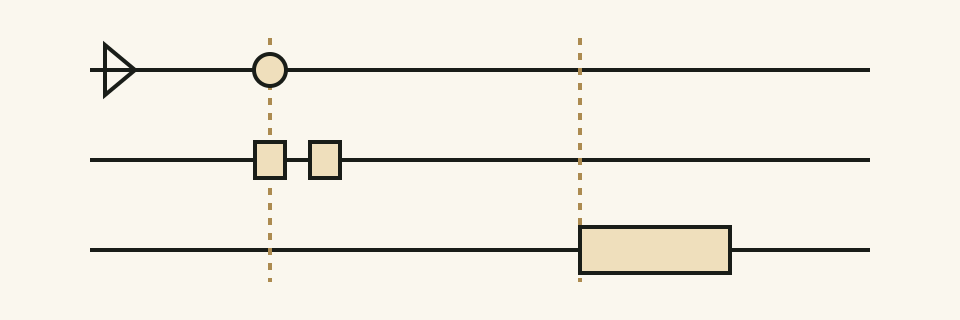 Here, the video, input events, and screen changes are illustrated from above.
The vertical dotted lines represent reference points to compare with, and the spacing represents actual measured time or allowable delay times.
Test notes should include the software version, input device, starting screen and initial values, input orders used, and the location of observation files.
If conditions change in the next execution, it should not be grouped as ‘repeating the same test’ but the altered conditions should be indicated.
When Checking for Reproducibility, Do Not Mix Conditions
The stage of checking whether it occurs again under the same operations and the stage of narrowing down causes by changing conditions have different purposes.
Initially, observations should be repeated under the secured conditions, and later, differences to be reviewed can be established for comparison.
The team should determine how many repetitions to conduct and what conditions to check based on the product's risks, reproducibility, and requirements.
| Examples of Conditions to Compare | Questions to Observe |
|---|---|
| Short press vs. long press | Do the actions defined in the design correspond to processing outcomes? |
| Continuous input vs. spaced input | Are intended two inputs missing or are additional inputs occurring? |
| Deletion followed by re-entry | Does what remains on the screen affect the next input? |
| Before and after confirmation | Do the displayed values match the confirmed settings? |
The items in the table are review candidates and not a common test list for all devices.
Input fields that do not support long pressing and those that have repeating input functions demonstrate varied expected behaviors.
Expectation of behavior should be specified prior to tests to allow for judgment based on the observed results.
After Modifications, Check the Intended Inputs as Well
If changes were made to reduce duplicate inputs, it should be checked whether the original problem has disappeared and also whether the user's intended inputs are not omitted.
If input processing conditions are changed, it is necessary to review related actions such as continuous inputs, deletions, and confirmations together.
Simply stating that 100 was not visible on the screen again does not completely explain the effect of the change.
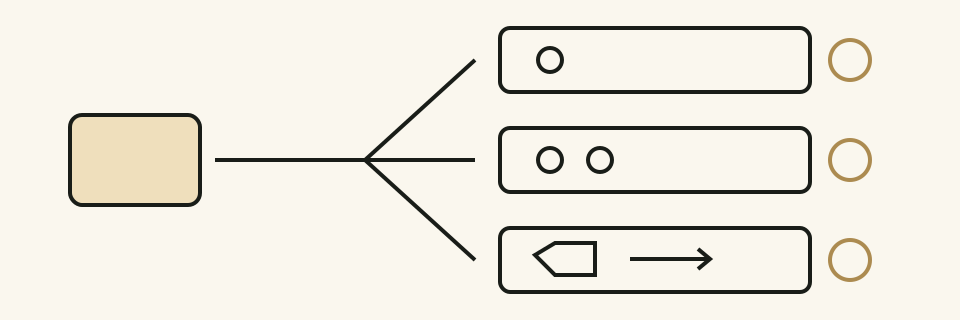 This is an internal review linking modifications and what actions to verify.
The three branches on the right imply actions to confirm, not test results.
Here, no specific time for key input filters or common passing metrics that apply to all products are suggested.
First, the meaning of the operation, input processing rules, and device risk should be organized, followed by connecting it to the verification criteria for the corresponding product.
The FDA explains that in infusion pumps, the software is involved in the user interface, pump control, and safety functions, making it difficult to limit input issues solely to screen design.
[2]
Records to Move to the Next Review
The investigation results should include confirmed phenomena, execution conditions, supporting files, and sections that have not yet been judged.
Particularly, being able to answer the following questions will make it easier for the next person in charge to confirm the same phenomena again.
- At what moment do the operational video and input logs point to the same time?
- At which stages are the logs generated and where are they not recorded?
- Have the display values and confirmed settings been verified?
- Following modifications, did new issues arise in terms of intended continuous input or deletion actions?
The scope of this article is how to observe and record input errors during development tests.
This is not guidance on operating infusion pumps in actual use or changing treatment settings.
Sources and Scope of Materials
Confirmation Date: 2026-10-15.
The following FDA web text was checked.
Images, tables, and test examples have not been reproduced, and the tables, figures, and development test examples in the text have been created separately by MedQraft.
This article does not define the current submission requirements or legal obligations for specific items.
- FDA, Examples of Reported Infusion Pump Problems: Example of single key operation and duplicate input leading to 10 mL/hour → 100 mL/hour in Software problems.
This is an official problem type introduction and has not been marked as the latest recall announcement.
- FDA, Infusion Pump Software Safety Research at FDA: Explanation of user interface, control, and safety functions in Software Safety.
Past regulation mentions included on the page have not been cited as current regulatory requirements.
Related Articles
- Connecting Software Requirements and Test Evidence: Perspective on linking expected results of input actions to tests.
- How to Differentiate Between UTC and Local Time: How to read the time standards of different records.
- How to Review User Operations for First-time Users: Perspective on evaluating user understanding and operation separate from input processing defects.
Let's talk
Apply what you have read
to your product.
Tell us your product's current stage and the questions you need to review.
Discuss your questions ↗